Do I need a desktop PC to day trade? No — a desktop PC is not strictly necessary to day trade, but a desktop PC often brings superior stability, multi‑monitor support and better trading performance for serious day traders.
For day trading in fast-moving financial markets, the trading setup matters as much as the strategy. A desktop PC can deliver a more robust platform: higher sustained CPU performance, easier multi‑monitor wiring, dedicated SSD storage and simpler hardware upgrades. Yet many modern laptops, properly configured, handle live charts and order execution reliably, especially when paired with a second monitor and a clean environment dedicated to trading software. The real decision hinges on priorities: mobility versus raw stability, cost versus expandability, and whether the user needs a long session with multiple feeds open. Through a short case — a part‑time trader named Maya who started on a laptop and upgraded to a desktop to reduce latency and add three screens — this guide explains practical computer requirements, recommended hardware for trading, multi‑screen setups, security and backup plans. Each section gives clear lists, a compact table of options, and actionable insights to help choose the right path without overbuying.
Do desktop PCs improve day trading performance? — desktop PC vs laptop for day trading
Desktop PCs typically deliver greater thermal headroom, easier cooling and more upgrade options, which translate into steady performance during long trading sessions. They allow day traders to add multiple GPUs, more RAM and fast NVMe SSDs without compromise.
- Stability: desktops heat-manage better during 7–12 hour sessions, reducing throttling.
- Expandability: easy to add monitors, storage, or a dedicated graphics card for multi‑monitor layouts.
- Cost-efficiency: desktops often offer more performance per dollar than equally powerful laptops.
| Feature | Desktop PC | Laptop |
|---|---|---|
| Multi‑monitor support | Excellent — multiple outputs, add GPUs | Good — usually 1–2 outputs, docking recommended |
| Upgradability | High — swap CPU, GPU, storage, RAM | Limited — mainly storage/RAM on some models |
| Mobility | Low — fixed workstation | High — trade from different locations |
| Price per performance | Better | Higher |
Insight: For traders who value trading performance and long, uninterrupted sessions, a desktop PC provides measurable advantages over most laptops.
Recommended desktop PC specs for day trading — computer requirements & hardware for trading
Choosing hardware should match the chosen trading software and the number of simultaneous data feeds. A balanced build prioritizes CPU single-thread speed, sufficient RAM and an SSD for fast data access.
- CPU: modern Intel Core i7/i9 or AMD Ryzen 7/9 (13th Gen or newer recommended) for quick charting and platform responsiveness.
- RAM: minimum 16GB; 32GB ideal for multiple platforms and heavy charting.
- Storage: NVMe SSD ≥250GB dedicated to trading data and logs.
- GPU: mid-range dedicated GPU for multi‑monitor setups; not critical for calculations but useful for rendering.
- Network: wired Ethernet plus a secondary Wi‑Fi/VPN option for redundancy.
| Component | Minimum | Recommended |
|---|---|---|
| Processor | Quad‑core 2.8GHz | Intel Core i7/i9 or AMD Ryzen 7/9 (latest gen) |
| RAM | 16GB | 32GB |
| Storage | SSD 250GB | NVMe 500GB+ (separate drive for OS and trading data) |
| Monitors | 1–2 x 1080p | 2–4 x 1440p or ultrawide |
| UPS / Power | Optional | Uninterruptible Power Supply (UPS) recommended |
Insight: Prioritise RAM, an NVMe SSD and a CPU with strong single‑thread speed to reduce lag in platforms and chart rendering.
Setting up trading screens for an effective trading setup
Screen layout is the heart of a day trader’s workflow. Organise charts, order tickets, news feeds and watchlists so that the eyes move naturally across priority zones.
- Primary monitor: main chart and execution window.
- Secondary: watchlist and depth or level‑2 data.
- Third: news feed, economic calendar and broker platform (Pocket Option, Quotex or Olymp Trade recommended for options/CFD execution where applicable).
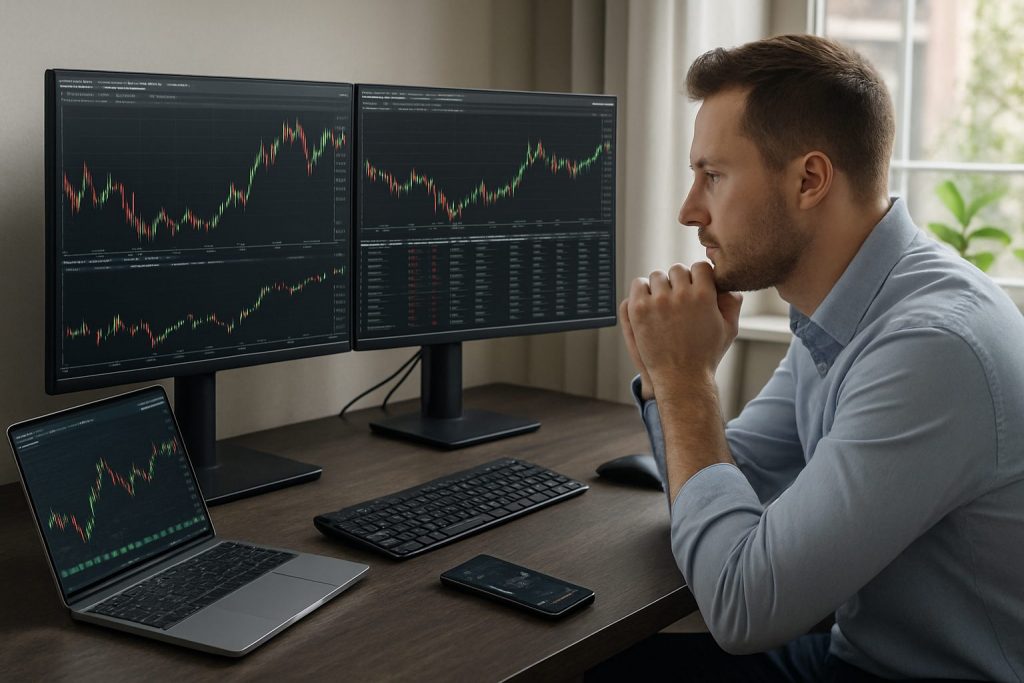
Maya began with two 24″ monitors and later switched one to a 34″ ultrawide to keep multiple charts visible without bezels; the change improved situational awareness and reduced window switching.
Insight: A thoughtful multi‑monitor arrangement reduces window juggling, improving reaction time and execution accuracy.
PC vs laptop: choosing the right day trader tools and portability balance
The choice often narrows to a stable desktop workstation or a powerful, portable laptop with docking. Each path suits different trader profiles.
- Laptop winner: traders who travel, attend events or trade from multiple locations.
- Desktop winner: traders who work long hours and need maximum reliability and upgradability.
- Hybrid approach: a dedicated laptop docked to a desktop‑class monitor array at home.
Insight: A hybrid setup — a reliable laptop dedicated to trading and docked at a home station — offers the best trade-off between mobility and performance.
Security, backups and keeping trading software reliable
Security is non-negotiable: platform access, account credentials and order integrity must be protected at all times. Backups and redundancy reduce the risk of catastrophic interruptions.
- Multi‑Factor Authentication: enable for broker accounts and trading platforms.
- Firewalls & antivirus: keep them updated but configured not to block trading software during sessions.
- Data backup: daily exports of logs, and automated cloud backups for critical setup files.
- Network redundancy: primary wired Ethernet plus a secondary 4G/5G hotspot for failover.
- UPS: an uninterruptible power supply protects mid‑trade operations and allows safe shutdowns.
Insight: Combining security measures with simple backup routines drastically reduces trading interruptions and protects capital.
FAQ
Do all day traders need multiple monitors? Multiple monitors are not mandatory, but they are highly recommended; they let a trader monitor price action, news and execution windows simultaneously, improving situational awareness.
Can a mid-range laptop handle day trading? Yes — a mid-range laptop with 16GB RAM, an SSD and a stable internet connection can be sufficient for many retail day traders, especially when paired with a second external monitor or dock.
Which component most affects trading performance? CPU single‑thread speed and sufficient RAM typically have the largest impact on chart redraws and platform responsiveness; an NVMe SSD also reduces data load times.
Is a UPS necessary for a day trading desktop PC? A UPS is strongly recommended to avoid sudden power loss during critical trades and to provide time for an orderly shutdown or to switch to backup internet connectivity.
Should trading software and data be kept on a separate drive? Yes — keeping trading software and logs on a dedicated SSD improves stability and simplifies backups, lowering the risk of corruption from unrelated applications.

With over a decade of experience navigating global financial markets, I specialize in identifying trends and managing risk as a professional trader. My passion for economics drives my daily commitment to staying ahead in this fast-paced industry. Outside of the markets, I enjoy exploring technology like cryptocurrencies and new investment strategies.