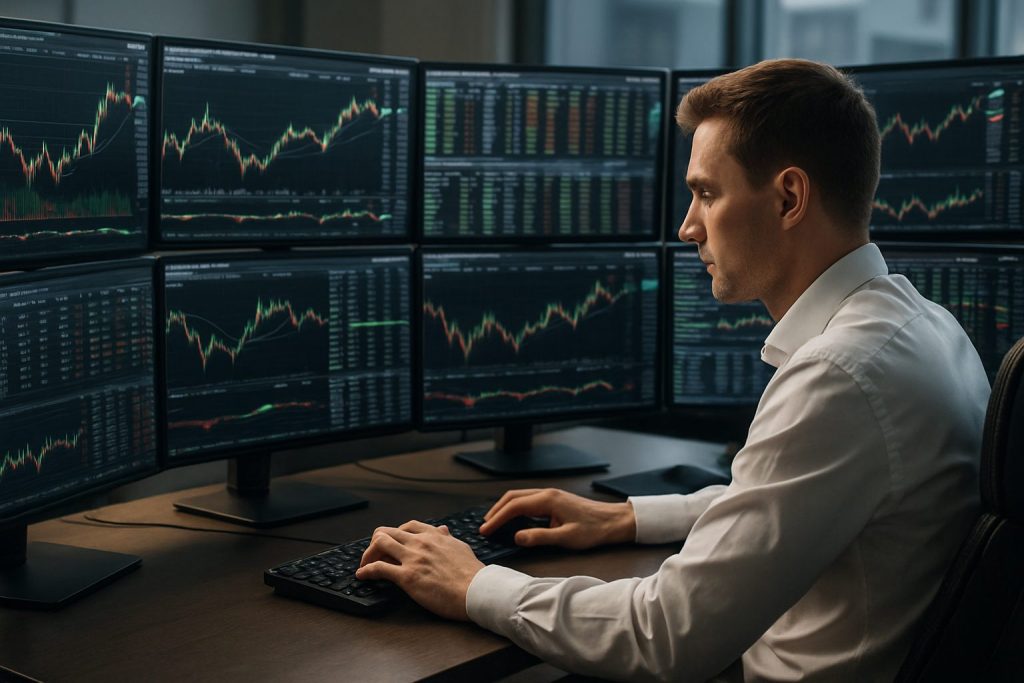
How many monitors do professional day traders use? Professional day traders typically use 3 to 6 monitors, with 3 monitors being the most common choice for a balanced trading workstation.
Trading success depends on speed of insight and the ability to maintain constant situational awareness. For professional day traders, the debate over the ideal number of monitors is less about status and more about function: clarity for charts, instant access to order entry, and live news or scanners for effective market analysis. A well-designed multi-monitor setup reduces window juggling, improves reaction times and supports disciplined risk management. Practical setups in 2025 range from compact dual-screen arrays for lean strategies to expansive six-monitor grids for traders who run Level 2 data, multiple timeframes and algorithmic dashboards simultaneously. Choosing the right configuration also ties into hardware: a GPU with sufficient outputs, proper mounts and attention to ergonomics and cable routing. For traders unsure whether a desktop or laptop fits their workflow, resources like the guides on desktop requirements and multi-monitor necessity can help decide the trade-offs between mobility and the full-screen command center experience (see links below).
How professional day traders choose the number of monitors — screen configuration for a trading workstation
Professional day traders select a screen configuration based on strategy, monitored assets and the need for real-time execution. Scalpers favour compact, high-refresh arrangements with direct order entry on the primary screen. Swing-oriented intraday traders prefer more charts and correlation layouts. The goal is always the same: reduce cognitive load while increasing clarity.
- 3 monitors — central chart, left for scanners/news, right for order entry; best balance for most traders.
- 4 monitors — adds room for additional charts or vertical watchlists; useful for multi-asset monitoring.
- 6 monitors — full command center for intense market analysis, Level 2, and portfolio oversight.
An early practical question is whether the workstation will be desktop-based or mobile. See guides on whether a desktop PC is necessary and whether multiple monitors truly help day trading workflows for practical comparisons: do I need a desktop PC to day trade? and do I need multiple monitors for day trading?
| Number of Monitors | Primary Use | Typical Trader |
|---|---|---|
| 2 | Chart + execution / watchlist | Beginner or simple strategies |
| 3 | Active charting, news/scanner, order screen | Most professional day traders |
| 4 | Extra chart or vertical watchlist, deeper analysis | Multi-asset traders |
| 6 | Full command center: Level 2, scanners, portfolio, news | High-frequency, prop-style traders |
Best multi-monitor setup for professional day traders — trading screens and trader productivity
To boost trader productivity, the arrangement matters as much as the count. A horizontal triple-monitor setup with the center at eye level creates a panoramic view that minimizes head movement. For deeper lists or order flow, a vertical panel complements horizontal charts.
- Center: 4K or high-PPI primary monitor for active charts.
- Left: market scanners, watchlists, or news feeds.
- Right: order entry, positions and risk tools.
Mixing resolutions—4K primary and 1440p secondaries—keeps GPU load manageable while preserving visual clarity. Research and field reports show that traders using 3+ monitors tend to execute faster and see more opportunities; this directly improves chance detection during volatile sessions. For hands-on advice about platform selection and whether a professional platform is required, consult: do I need a professional platform to start day trading?
Video commentary often highlights practical layout tips and software window management. These tutorials can accelerate the setup process and show real-world examples of monitor usage.
Lists of practical tweaks that improve screen usability
Small changes to the multi-monitor layout yield large comfort and speed gains.
- Use thin-bezel monitors to reduce visual breaks between screens.
- Angle side panels ~15 degrees inward for a natural field of view.
- Apply the 20-20-20 rule to prevent eye strain during long sessions.
Insight: prioritize clarity and ergonomics over sheer number of screens; extra monitors must serve a defined purpose.
Hardware, ergonomics and day trading equipment — monitor requirements and cable management
A reliable day trading equipment list includes high-resolution monitors, a capable GPU, ergonomic mounts and robust power/cable management. The hardware choices determine how many displays can be driven with stable performance.
- GPU: 8GB VRAM recommended for 3–4 high-resolution displays.
- Monitors: 27–32″ primary (4K), secondaries at 1440p.
- Mounts: VESA-compatible arms with cable routing.
| Component | Recommended Spec | Why it matters |
|---|---|---|
| GPU | 8GB VRAM, DisplayPort 1.4 | Supports multiple high-res outputs without lag |
| Power | 850W PSU, UPS 1500VA | Stable power and clean shutdowns for critical sessions |
| Mounts | VESA 75/100, adjustable arms | Ergonomic alignment and cable routing |
- Label and bundle cables to prevent tangles and ease maintenance.
- Use a UPS to protect against outages during active positions.
- Keep ventilation gaps and room temperature controlled for thermal stability.
Insight: proper hardware and cable management keep the focus on trading, not troubleshooting.
Advanced screen configurations — quad and six-monitor layouts for deep market analysis
For traders who need exhaustive market analysis, quad and six-monitor arrays provide the visual bandwidth to run scanners, Level 2, multiple timeframes and portfolio tools simultaneously.
- 2×2 quad grid — balanced view for top overview and bottom execution charts.
- 3×2 six-monitor — optimal for separating analysis layers: charts, scanners, news and execution.
- Vertical panels — excellent for long watchlists and time-and-sales windows.
Space and cooling are practical constraints. Six-monitor stations require larger desks, strategic cooling and dedicated circuits for safe power distribution. Practical reference about trading on laptops or preference for desktops: can i day trade on a laptop? Traders who value mobility often start with two screens and evolve to a fixed multi-monitor command center when strategy and capital justify it.
Insight: advanced arrays reward traders who have clear workflow mapping — each monitor must have a defined role.
Common questions about number of monitors for day trading
- How many monitors do most professional day traders use?
Most professional day traders use 3 to 4 monitors, with three being the most common because it provides space for active charts, news/scanners and execution screens without excessive complexity.
- Is 4K necessary for trading platforms like TradingView?
4K improves chart density and clarity on web-based platforms, but 1440p remains a solid choice for less GPU-intensive setups. The final choice depends on screen size, viewing distance and software scaling behavior.
- Should a trader start with multiple monitors or scale up?
Start with a lean setup and add screens as the strategy and workflows demand. Resources on desktop needs and multiple monitors can guide this decision: desktop vs laptop guide and multi-monitor necessity.
- Do vertical monitors help?
Yes. A vertical monitor is excellent for watchlists, news feeds and time-and-sales windows; combine one vertical with horizontal displays for best flexibility.
Further resources: For practical step-by-step setup advice and platform compatibility checks, review the guides on multi-monitor needs and platform requirements: do i need multiple monitors for day trading?, do i need a professional platform to start day trading? and can i day trade on a laptop? Experience shows that the right trading screens and a clearly defined multi-monitor setup turn information into timely action, supporting sharper decisions and better risk control.

With over a decade of experience navigating global financial markets, I specialize in identifying trends and managing risk as a professional trader. My passion for economics drives my daily commitment to staying ahead in this fast-paced industry. Outside of the markets, I enjoy exploring technology like cryptocurrencies and new investment strategies.